Omarchy On Old Hardware
I recently had to reinstall Omarchy on my ancient HP machine from the turn of the century (yes, this rig is still kicking!).
I started by following the manual installation instructions, which say to install Arch Linux first, then run a curl one-liner.
Installing Arch Linux
Installing from an old Arch Linux USB gave me some issues. The installer would get to a certain point, then fail with an error like:
error: gnupg: signature from "Levente Polyak (anthraxx) [email protected]" is unknown trust
...
To get around the issue, I had to update the Arch Linux keyring with the following command (prior to running archinstall):
pacman -Sy archlinux-keyring
Configuring Omarchy
Now that I got a base Arch Linux system installed with Omarchy on top, I need to make a few minor tweaks to support my ancient hardware.
Alacritty instead of Ghostty
Unfortunately for me, Ghostty throws an OpenGL error when starting up, which means almost every aspect of Omarchy is broken.

Never fear, just open Alacritty from the Super + Space menu, and run the following command:
omarchy-install-terminal alacritty
This will reset the default terminal to Alacritty so that all the TUIs will work.
Chromium Hardware Acceleration
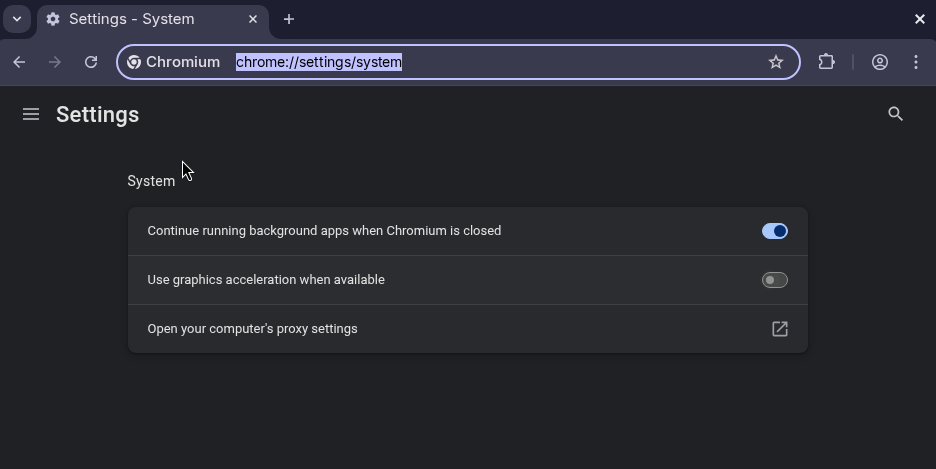
In my particular case, Chromium was glitching out like crazy. As I moved the mouse across the window, the screen would glitch out and flicker. The fix was to disable hardware acceleration in chrome://settings/system. Make sure that "Use graphics acceleration when available" is turned off.
What's Next?
The whole reason I had to reinstall Omarchy was due to a borked upgrade. And, of course, I had no backups. So, I'm going to dive into btrfs snapshots to see if that can keep me at peace of mind in case things go wrong again.